Two ways to send files
There are two distinct ways to provide a file to Aimee, each with different format requirements:
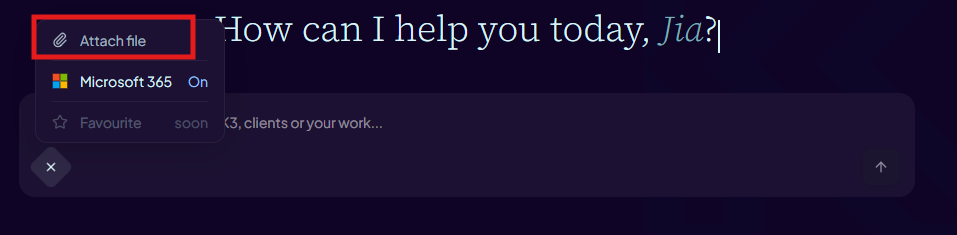
- Chat attachment (paperclip icon, drag/drop, or pasted clipboard image in the composer) — accepts up to 5 images, PDF, DOCX, XLSX, PPTX, TXT, CSV, and Markdown files per message. Use this for files you want Aimee to read or analyse in a conversation.
- Document library upload (Documents section → Upload) — accepts DOCX files only. Use this when you want a versioned, editable document that Aimee can work on over time.
File size limits
- Chat attachments support up to 5 files per message, with each file up to 10 MB.
- Document library uploads accept one DOCX file up to 10 MB at a time.
- Pasted screenshots/images are attached automatically, and large blocks of pasted text in the chat composer may be automatically converted to a .txt attachment.
Files larger than 10 MB will be rejected at upload. Split the content or reduce the file size before attaching.
How long are attachments kept?
Chat attachments are stored for the lifetime of the conversation. If you delete the conversation the attached files are also removed. Documents in the document library are kept until you explicitly delete them.
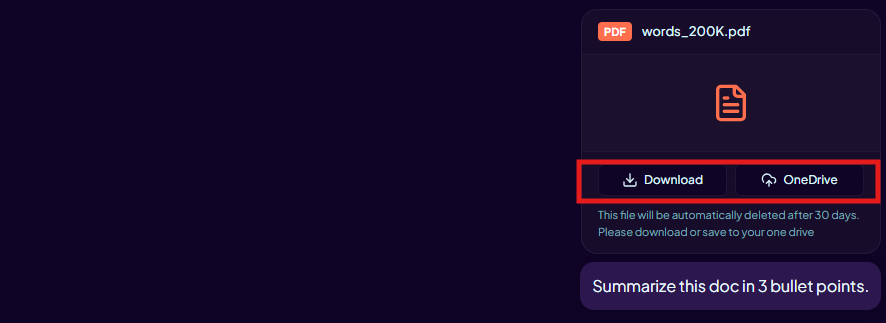
To keep a copy of a file beyond the conversation, use the Save to OneDrive button that appears on the attachment chip after sending.
Who can see your attachments?
Attachments are scoped to your account. Other users cannot access your uploaded files or documents. Aimee only reads a file when you explicitly include it in a message.
Do not upload files containing highly sensitive or regulated data unless your organisation has approved this use case. Contact your administrator if you are unsure.