How to branch
- Find the assistant or user message you want to branch from.
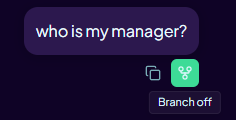
- Hover the message and click the "Branch" action button that appears as shown in the screenshot below.
- Confirm to open the new branch. It starts as a separate conversation from that point.
- Your new branch automatically carries context from the ancestor thread.
Branching is disabled while a message is still streaming. Wait for the response to finish before branching.
What branching does
A branch is an independent conversation that starts at a chosen message. Changes you make in the branch do not affect the original thread. The original conversation stays unchanged and is still listed in the sidebar.
Use branching when you want to try a different instruction or question without losing your existing conversation, or when you want to explore multiple directions in parallel.