How Microsoft 365 access works
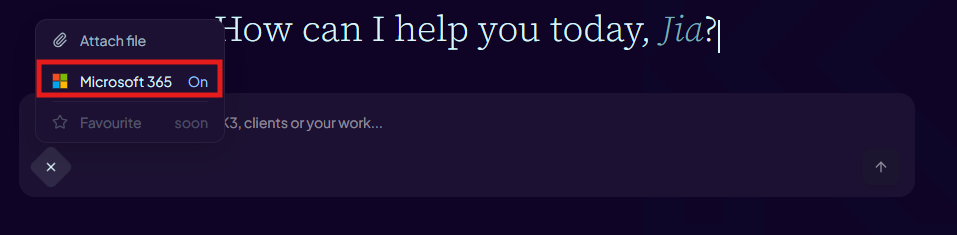
When you enable the Microsoft 365 toggle in the chat composer, Aimee can call a set of Microsoft Graph tools on your behalf. All access is delegated — Aimee only sees data you yourself have permission to access in Microsoft 365. Your credentials are never stored; Aimee uses a short-lived access token that is refreshed alongside your session.
Outlook — email
- List your most recent emails across any folder.
- Search by subject, sender, date range, or keyword.
- Read the full content of a specific email or thread.
Example prompts: "Show me unread emails from last week", "Find emails from Sarah about the Q3 report", "Read the latest email in my inbox."
Calendar — meetings and availability
- List your upcoming or past meetings.
- Check your availability for a given time window.
- Create a new calendar event with a title, date, time, and optional attendees.
Example prompts: "What meetings do I have tomorrow?", "Am I free on Thursday afternoon?", "Book a 30-minute sync with Alex at 2 pm on Friday."
When Aimee creates a meeting it will show you the details to confirm before anything is saved to your calendar.
OneDrive — personal files
- Search for files by name or keyword across your personal OneDrive.
- Read the content of a specific file (supported formats: Office documents, PDF, text).
- List your most recently modified files.
- List files that others have shared with you.
- Create or update a file in OneDrive (used when Aimee generates or edits a document on your behalf).
Example prompts: "Find my project proposal on OneDrive", "Read the Q2 summary spreadsheet in my OneDrive", "What files were shared with me this week?"
Teams — messages and channels
- Search for messages across Teams channels and chats.
- Search for Teams channels by name or keyword.
Example prompts: "Find Teams messages about the product launch", "Search for the engineering channel."
Org chart — people and reporting lines
- Look up your own manager.
- Look up your direct reports.
- Look up the manager or direct reports of another user.
- Search for people in your organisation by name or role.
Example prompts: "Who is my manager?", "Who reports to Jane Smith?", "Search for people on the data team."
People and tasks
- List your most frequently contacted people.
- Check the presence status of a colleague (available, busy, away, etc.).
- List your To Do tasks from Microsoft Tasks.
Example prompts: "Who do I contact most often?", "Is Alex online?", "Show me my open To Do tasks."